BPi M2-Ultra - HDD Installation
Weil ich nun einen aktuelleren Kernel habe, siehe folgenden Artikel BPi M2-Ultra - Kernel 3.10.104, kam ich auf die Idee das Sys mal auf eine SSD zu installieren.
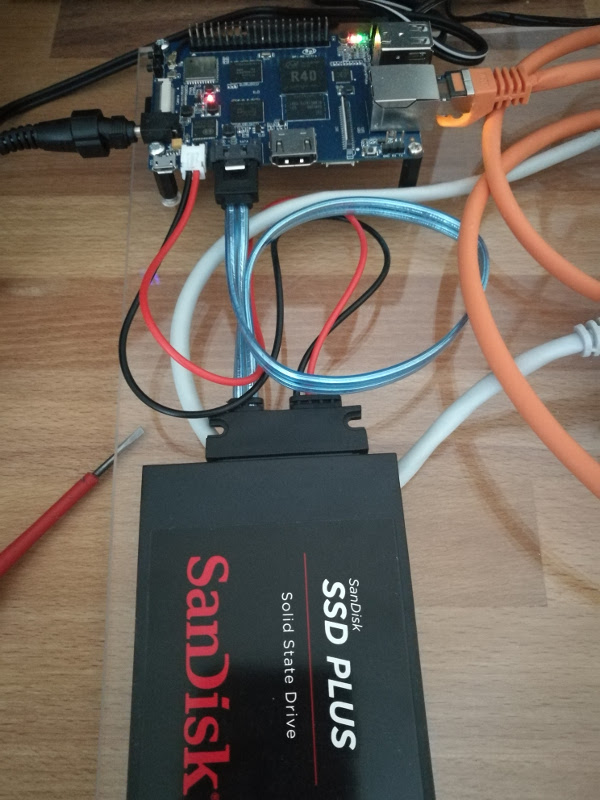
Dazu kann man sich in großen Teilen an folgende Anleitung halten Bananian 16.04 auf einer HDD installieren incl. WLan Das einzige was man anpassen muss, ist der Bootvorgang.
Bootparameter bearbeiten:
mount /dev/mmcblk0p1 /mnt
Die Datei uEnv.txt findet man dann unter /mnt/bananapi/bpi-m2u/linux. Diese editiert man dann wie folgt.
bpi=bananapiboard=bpi-m2uchip=r40service=linuxkernel=uImage#kaddr=0x47000000rdaddr=0x49000000##
ahello=echo Banana Pi ${board} chip: $chip Service: $service
aboot=if fatload $device $partition $rdaddr ${bpi}/berryboot.img; then bootm $kaddr $rdaddr ; else bootm $kaddr; fiaload_kernel=fatload $device $partition $kaddr ${bpi}/${board}/${service}/${kernel}
uenvcmd=run ahello aload_kernel aboot
## from sys_config.fex##;output_type (0:none; 1:lcd; 2:tv; 3:hdmi; 4:vga)#;output_mode (used for tv/hdmi output, 0:480i 1:576i 2:480p 3:576p 4:720p50 5:720p60 6:1080i50 7:1080i60 8:1080p24 9:1080p50 10:1080p60 11:pal 14:ntsc)#
# ref. sys_config.fex, use default script.bin#bootargs=enforcing=1 earlyprintk=sunxi-uart,0x01c28000 initcall_debug=0 console=ttyS0,115200 console=tty1 board=bpi-m2u loglevel=8 root=/dev/mmcblk0p2 rw rootwait init=/init cma=256M bootmenutimeout=10 datad$bootargs=enforcing=1 initcall_debug=0 console=ttyS0,115200n8 console=tty1 no_console_suspend board=bpi-m2u loglevel=4 root=/dev/sda1 rw rootwait init=/init cma=256M panic=10 consoleblank=0 bootmenutimeout=10 $
# output HDMI 1080P (type:3 mode:10)#bootargs=enforcing=1 initcall_debug=0 console=ttyS0,115200n8 console=tty1 no_console_suspend board=bpi-m2u loglevel=4 root=/dev/mmcblk0p2 rw rootwait init=/init cma=256M panic=10 consoleblank=0 bootmenutimeo$
# output HDMI 720P (type:3 mode:5)#bootargs=enforcing=1 initcall_debug=0 console=ttyS0,115200n8 console=tty1 no_console_suspend board=bpi-m2u loglevel=4 root=/dev/mmcblk0p2 rw rootwait init=/init cma=256M panic=10 consoleblank=0 bootmenutimeo$
# output HDMI 480P (type:3 mode:2)#bootargs=enforcing=1 initcall_debug=0 console=ttyS0,115200n8 console=tty1 no_console_suspend board=bpi-m2u loglevel=4 root=/dev/mmcblk0p2 rw rootwait init=/init cma=256M panic=10 consoleblank=0 bootmenutimeo$
Abspeichern - Fertig!
Ein
shutdown -r now
und das System startet von der SSD.
Ein
df -h
und wir sehen das alles korrekt ist.
root@bpi-iot-ros-ai:~# df -hFilesystem Size Used Avail Use% Mounted on/dev/root 220G 2.3G 207G 2% /devtmpfs 879M 4.0K 879M 1% /devtmpfs 1007M 0 1007M 0% /dev/shmtmpfs 1007M 8.7M 998M 1% /runtmpfs 5.0M 4.0K 5.0M 1% /run/locktmpfs 1007M 0 1007M 0% /sys/fs/cgrouptmpfs 1007M 8.0K 1007M 1% /tmptmpfs 202M 0 202M 0% /run/user/0
Viel Spaß!