BananaPi - Router / Firewall selbstgebaut
Mein Hirn braucht mal wieder Futter ? Da ich ein wenig mit VLan's rumspielen möchte, das aber nicht unbedingt live in meinem Netz machen wollte kam die Idee auf. Dann wollen wir mal..
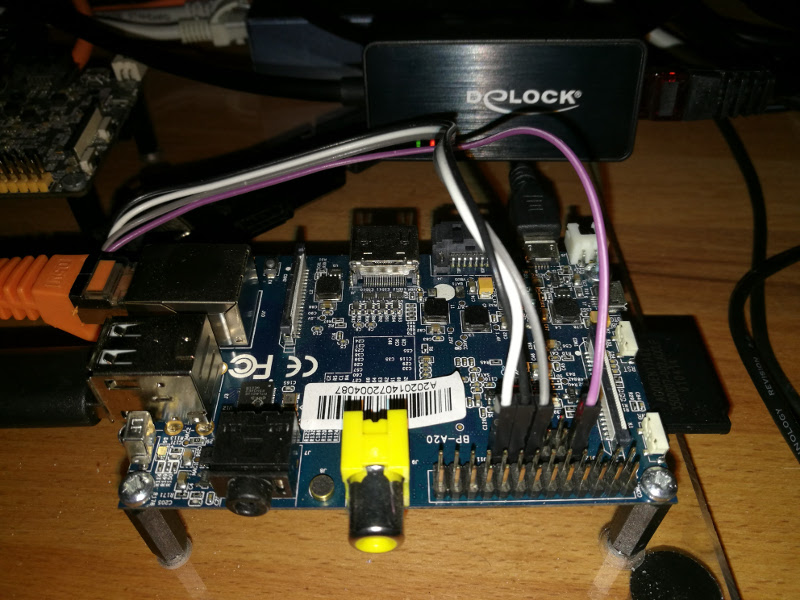
Die Hardware:
USB-to-LAN Adapter
Die Software:
Debian auf BananaPi installieren
Nach der Installation von Debian haben wir folgenden Kernel. Linux Debian 3.16.0-4-armmp-lpae #1 SMP Debian 3.16.43-2 (2017-04-30) armv7l GNU/Linux
Laut kernel.org ein recht aktuelles System. Übrigens ein gutes System, wenn man mal einen kleinen Server braucht ? Weiter geht's..
Konfiguration der Schnittstellen:
Die Idee ist
eth0 = Internet
eth1 = LAN
dazwischen soll iptables auf uns aufpassen. Für eth0 nutze ich die eingebaute Schnittstelle des BananaPi's. Das LAN wird über den USB-to-LAN Adapter versorgt.
Adressbereiche:
eth0 = DHCP (hängt an meinem lokalen Netz)
eth1 = 192.168.0.1 DHCP-Bereich von 192.168.0.10 bis 192.168.0.20
/etc/network/interfaces
# This file describes the network interfaces available on your system# and how to activate them. For more information, see interfaces(5).
source /etc/network/interfaces.d/*
# The loopback network interfaceauto lo eth1iface lo inet loopback
# The primary network interfaceallow-hotplug eth0iface eth0 inet dhcp
# Second networkiface eth1 inet staticaddress 192.168.0.1netmask 255.255.255.0network 192.168.0.0broadcast 192.168.0.255
Danach gibt uns dann ein
ifconfig
folgende Ausgabe.
root@debian:~# ifconfigeth0 Link encap:Ethernet HWaddr 02:95:0a:c2:bc:0ainet addr:192.168.3.10 Bcast:192.168.3.255 Mask:255.255.255.0inet6 addr: fe80::95:aff:fec2:bc0a/64 Scope:LinkUP BROADCAST RUNNING MULTICAST MTU:1500 Metric:1RX packets:15331 errors:0 dropped:0 overruns:0 frame:0TX packets:7898 errors:0 dropped:0 overruns:0 carrier:0collisions:0 txqueuelen:1000RX bytes:21502474 (20.5 MiB) TX bytes:634313 (619.4 KiB)Interrupt:117
eth1 Link encap:Ethernet HWaddr 00:0a:cd:2a:ec:37inet addr:192.168.0.1 Bcast:192.168.0.254 Mask:255.255.255.0inet6 addr: fe80::20a:cdff:fe2a:ec37/64 Scope:LinkUP BROADCAST RUNNING MULTICAST MTU:1500 Metric:1RX packets:7611 errors:0 dropped:0 overruns:0 frame:0TX packets:14776 errors:0 dropped:0 overruns:0 carrier:0collisions:0 txqueuelen:1000RX bytes:427618 (417.5 KiB) TX bytes:21563152 (20.5 MiB)
lo Link encap:Local Loopbackinet addr:127.0.0.1 Mask:255.0.0.0inet6 addr: ::1/128 Scope:HostUP LOOPBACK RUNNING MTU:65536 Metric:1RX packets:0 errors:0 dropped:0 overruns:0 frame:0TX packets:0 errors:0 dropped:0 overruns:0 carrier:0collisions:0 txqueuelen:0RX bytes:0 (0.0 B) TX bytes:0 (0.0 B)
So weit sieht das schon gut aus. eth0 und eth1 sind so weit funktional. Dann kloppen wir mal die Firewall dazwischen. Aus dem Debian Wiki das Beispiel genommen und ein paar kleine Änderungen durchgeführt. Das sieht dann wie folgt aus. Ich nenne die Datei firewall.sh, sie liegt in /etc
/etc/firewall.sh
#!/bin/sh# This is a more complex setup, for a home firewall:# * One interface plug to the ISP conection (eth0). Using DHCP.# * One interface plug to the local LAN switch (eth1). Using 192.168.0.0/24.# * Traffic open from the LAN to the SSH in the firewall.# * Traffic open and translated, from the local LAN to internet.# * Traffic open from internet, to a local web server.# * Logging of dropped traffic, using a specific ''log level'' to configure a separate file in syslog/rsyslog.
PATH='/sbin'
## INIT
# Flush previous rules, delete chains and reset countersiptables -Fiptables -Xiptables -Ziptables -t nat -F
# Default policiesiptables -P INPUT DROPiptables -P OUTPUT DROPiptables -P FORWARD DROP
echo -n '1' > /proc/sys/net/ipv4/ip_forwardecho -n '0' > /proc/sys/net/ipv4/conf/all/accept_source_routeecho -n '0' > /proc/sys/net/ipv4/conf/all/accept_redirectsecho -n '1' > /proc/sys/net/ipv4/icmp_echo_ignore_broadcastsecho -n '1' > /proc/sys/net/ipv4/icmp_ignore_bogus_error_responses
# Enable loopback trafficiptables -A INPUT -i lo -j ACCEPTiptables -A OUTPUT -o lo -j ACCEPT
# Enable statefull rules (after that, only need to allow NEW conections)iptables -A INPUT -m conntrack --ctstate ESTABLISHED,RELATED -j ACCEPTiptables -A OUTPUT -m conntrack --ctstate ESTABLISHED,RELATED -j ACCEPTiptables -A FORWARD -m conntrack --ctstate ESTABLISHED,RELATED -j ACCEPT
# Drop invalid state packetsiptables -A INPUT -m conntrack --ctstate INVALID -j DROPiptables -A OUTPUT -m conntrack --ctstate INVALID -j DROPiptables -A FORWARD -m conntrack --ctstate INVALID -j DROP
## INPUT
# Incoming ssh from the LANiptables -A INPUT -i eth1 -s 192.168.0.0/24 \-p tcp --dport 22 -m conntrack --ctstate NEW -j ACCEPT
# Allow any connection from this host.iptables -A INPUT -i lo -j ACCEPT
# Allow any connection from the local network.iptables -A INPUT -s 192.168.0.0/24 -j ACCEPT
# Allow all broadcast traffic.iptables -A INPUT -m pkttype --pkt-type broadcast -j ACCEPT
## OUTPUT
# Enable al outgoing traffic to internetiptables -A OUTPUT -o eth0 -d 192.16.3.0/0 -j ACCEPT
# Enable access traffic, from the firewall to the LAN networkiptables -A OUTPUT -o eth1 -d 192.168.0.0/24 -j ACCEPT
## FORWARD
# We have dynamic IP (DHCP), so we've to masqueradeiptables -t nat -A POSTROUTING -o eth0 -j MASQUERADEiptables -A FORWARD -o eth0 -i eth1 -s 192.168.0.0/24 \-m conntrack --ctstate NEW -j ACCEPT
# Redirect HTTP (tcp/80) to the web server (192.168.0.2)#iptables -t nat -A PREROUTING -i eth0 -p tcp --dport 80 \# -j DNAT --to-destination 192.168.0.2:80##iptables -A FORWARD -i eth0 -p tcp --dport 80 \# -o eth1 -d 192.168.0.2 \# -m conntrack --ctstate NEW -j ACCEPT
## LOGGING
iptables -A INPUT -j LOG --log-level 4 --log-prefix '[FW INPUT]: 'iptables -A OUTPUT -j LOG --log-level 4 --log-prefix '[FW OUTPUT]: 'iptables -A FORWARD -j LOG --log-level 4 --log-prefix '[FW FORWARD ]: '
Der Teil mit dem Webserver ist auskommentiert, den brauche ich im Moment nicht. Danach funktionierte so weit alles, mein Notebook konnte mit einer fixen IP-Adresse eine Verbindung aufbauen und kam in's Internet.
DHCP-Server:
apt-get install dnsmasq
Config in /etc/dnsmasq.conf
interface=eth1no-dhcp-interface=eth0listen-address=127.0.0.1listen-address=192.168.3.1dhcp-range=eth1,192.168.0.10,192.168.0.20,12h
Der DHCP-Server stellt auf der eth1 IP-Adressen zur Verfügung. Die 3.1 ist mein DNS-Server im lokalen Netz.(eth0)
Doch sobald ich eine DHCP Verbindung am Notebook aufbauen wollte klappte das nicht, nach einigen Stunden Sucherei bin ich dann darüber gestolpert, das Iptables die Verbindung blockt. Dank einer schönen Antwort im Netz, konnte ich dann drei Befehle hinzufügen, die DHCP ermöglichten. Das sind
# Allow any connection from this host.iptables -A INPUT -i lo -j ACCEPT
# Allow any connection from the local network.iptables -A INPUT -s 192.168.0.0/24 -j ACCEPT
# Allow all broadcast traffic.iptables -A INPUT -m pkttype --pkt-type broadcast -j ACCEPT
Damit funktioniert alles wie gewünscht. Da ich das Script firewall.sh immer von Hand gestartet habe, muss das noch beim Booten aufgerufen werden. Dazu editiert man die Datei /etc/rc.local wie folgt.
#!/bin/sh## rc.local## This script is executed at the end of each multiuser runlevel.# Make sure that the script will "exit 0" on success or any other# value on error.## In order to enable or disable this script just change the execution# bits.## By default this script does nothing.
set -e
# Launch my netfilter rulesif [ -e '/etc/firewall.sh' ]then/bin/sh '/etc/firewall.sh'fi
exit 0
Damit wird nun beim Starten automatisch das Script aufgerufen und alles entsprechend eingestellt. Mit
iptables -L
kann man sich das anschauen.
root@debian:~# iptables -LChain INPUT (policy DROP)target prot opt source destinationACCEPT all -- anywhere anywhereACCEPT all -- anywhere anywhere ctstate RELATED,ESTABLISHEDDROP all -- anywhere anywhere ctstate INVALIDACCEPT tcp -- 192.168.0.0/24 anywhere tcp dpt:ssh ctstate NEWLOG all -- anywhere anywhere LOG level warning prefix "[FW INPUT]: "
Chain FORWARD (policy DROP)target prot opt source destinationACCEPT all -- anywhere anywhere ctstate RELATED,ESTABLISHEDDROP all -- anywhere anywhere ctstate INVALIDACCEPT all -- 192.168.0.0/24 anywhere ctstate NEWLOG all -- anywhere anywhere LOG level warning prefix "[FW FORWARD ]: "
Chain OUTPUT (policy DROP)target prot opt source destinationACCEPT all -- anywhere anywhereACCEPT all -- anywhere anywhere ctstate RELATED,ESTABLISHEDDROP all -- anywhere anywhere ctstate INVALIDACCEPT all -- anywhere anywhereACCEPT all -- anywhere 192.168.0.0/24LOG all -- anywhere anywhere LOG level warning prefix "[FW OUTPUT]: "
Wichtig ist ja immer, welche Ports sind auf. Das kann man schön mit netstat -nlp sich anzeigen lassen.
root@debian:~# netstat -nlpActive Internet connections (only servers)Proto Recv-Q Send-Q Local Address Foreign Address State PID/Program nametcp 0 0 0.0.0.0:111 0.0.0.0:* LISTEN 277/rpcbindtcp 0 0 0.0.0.0:53 0.0.0.0:* LISTEN 327/dnsmasqtcp 0 0 0.0.0.0:22 0.0.0.0:* LISTEN 302/sshdtcp 0 0 127.0.0.1:25 0.0.0.0:* LISTEN 585/exim4tcp 0 0 0.0.0.0:44041 0.0.0.0:* LISTEN 286/rpc.statdtcp6 0 0 :::111 :::* LISTEN 277/rpcbindtcp6 0 0 :::53 :::* LISTEN 327/dnsmasqtcp6 0 0 :::22 :::* LISTEN 302/sshdtcp6 0 0 :::50167 :::* LISTEN 286/rpc.statdtcp6 0 0 ::1:25 :::* LISTEN 585/exim4udp 0 0 0.0.0.0:40268 0.0.0.0:* 286/rpc.statdudp 0 0 0.0.0.0:872 0.0.0.0:* 277/rpcbindudp 0 0 127.0.0.1:886 0.0.0.0:* 286/rpc.statdudp 0 0 0.0.0.0:53 0.0.0.0:* 327/dnsmasqudp 0 0 0.0.0.0:67 0.0.0.0:* 327/dnsmasqudp 0 0 0.0.0.0:68 0.0.0.0:* 601/dhclientudp 0 0 0.0.0.0:111 0.0.0.0:* 277/rpcbindudp 0 0 0.0.0.0:21122 0.0.0.0:* 601/dhclientudp6 0 0 :::872 :::* 277/rpcbindudp6 0 0 :::38450 :::* 286/rpc.statdudp6 0 0 :::53 :::* 327/dnsmasqudp6 0 0 :::111 :::* 277/rpcbindudp6 0 0 :::23721 :::* 601/dhclientActive UNIX domain sockets (only servers)Proto RefCnt Flags Type State I-Node PID/Program name Pathunix 2 [ ACC ] STREAM LISTENING 8453 1/init /run/systemd/privateunix 2 [ ACC ] SEQPACKET LISTENING 8475 1/init /run/udev/controlunix 2 [ ACC ] STREAM LISTENING 8478 1/init /run/systemd/journal/stdoutunix 2 [ ACC ] STREAM LISTENING 10321 277/rpcbind /run/rpcbind.sockunix 2 [ ACC ] STREAM LISTENING 10411 1/init /var/run/dbus/system_bus_socket
Und einen sehr schönen Befehl habe ich bei der ganzen Sache auch kennen gelernt.
tailf /var/log/kern.log
Der zeigt die Kernelmeldungen live im Fenster an. Sehr, sehr praktisch.
Nun auf offene Ports von außen testen.
nmap -v -Pn 192.168.3.10
Starting Nmap 7.01 ( https://nmap.org ) at 2017-06-01 19:50 CESTInitiating Parallel DNS resolution of 1 host. at 19:50Completed Parallel DNS resolution of 1 host. at 19:50, 0.00s elapsedInitiating Connect Scan at 19:50Scanning debian.localdomain (192.168.3.10) [1000 ports]Connect Scan Timing: About 15.50% done; ETC: 19:53 (0:02:49 remaining)Connect Scan Timing: About 30.50% done; ETC: 19:53 (0:02:19 remaining)Connect Scan Timing: About 45.50% done; ETC: 19:53 (0:01:49 remaining)Connect Scan Timing: About 60.50% done; ETC: 19:53 (0:01:19 remaining)Connect Scan Timing: About 75.00% done; ETC: 19:53 (0:00:50 remaining)Completed Connect Scan at 19:53, 201.22s elapsed (1000 total ports)Nmap scan report for debian.localdomain (192.168.3.10)Host is up.All 1000 scanned ports on debian.localdomain (192.168.3.10) are filtered
Read data files from: /usr/bin/../share/nmapNmap done: 1 IP address (1 host up) scanned in 201.25 seconds
Für mich sieht das sicher aus, denke das könnte man so ans Internet hängen. Dazu müßte aber auf dem Server noch eine Menge eingestellt werden, aber das soll hier nicht mit rein. Was fehlt noch? Mal eben die Geschwindigkeit testen.
frank@frank-MS-7850 ~ $ iperf3 -s-----------------------------------------------------------Server listening on 5201-----------------------------------------------------------Accepted connection from 192.168.3.10, port 57486[ 5] local 192.168.3.213 port 5201 connected to 192.168.3.10 port 57488[ ID] Interval Transfer Bandwidth[ 5] 0.00-1.00 sec 19.2 MBytes 161 Mbits/sec[ 5] 1.00-2.00 sec 20.1 MBytes 168 Mbits/sec[ 5] 2.00-3.00 sec 20.1 MBytes 168 Mbits/sec[ 5] 3.00-4.00 sec 20.0 MBytes 168 Mbits/sec[ 5] 4.00-5.00 sec 20.0 MBytes 168 Mbits/sec[ 5] 5.00-6.00 sec 20.0 MBytes 167 Mbits/sec[ 5] 6.00-7.00 sec 20.1 MBytes 169 Mbits/sec[ 5] 7.00-8.00 sec 20.0 MBytes 168 Mbits/sec[ 5] 8.00-9.00 sec 20.0 MBytes 168 Mbits/sec[ 5] 9.00-10.00 sec 20.1 MBytes 169 Mbits/sec[ 5] 10.00-10.05 sec 949 KBytes 167 Mbits/sec- - - - - - - - - - - - - - - - - - - - - - - - -[ ID] Interval Transfer Bandwidth Retr[ 5] 0.00-10.05 sec 202 MBytes 169 Mbits/sec 0 sender[ 5] 0.00-10.05 sec 201 MBytes 167 Mbits/sec receiver-----------------------------------------------------------Server listening on 5201-----------------------------------------------------------Accepted connection from 192.168.3.200, port 56174[ 5] local 192.168.3.213 port 5201 connected to 192.168.3.200 port 56176[ ID] Interval Transfer Bandwidth[ 5] 0.00-1.00 sec 85.3 MBytes 715 Mbits/sec[ 5] 1.00-2.00 sec 88.1 MBytes 739 Mbits/sec[ 5] 2.00-3.00 sec 87.0 MBytes 730 Mbits/sec[ 5] 3.00-4.00 sec 83.5 MBytes 700 Mbits/sec[ 5] 4.00-5.00 sec 76.0 MBytes 638 Mbits/sec[ 5] 5.00-6.00 sec 78.8 MBytes 661 Mbits/sec[ 5] 6.00-7.00 sec 87.2 MBytes 731 Mbits/sec[ 5] 7.00-8.00 sec 87.3 MBytes 732 Mbits/sec[ 5] 8.00-9.00 sec 87.5 MBytes 734 Mbits/sec[ 5] 9.00-10.00 sec 87.7 MBytes 735 Mbits/sec[ 5] 10.00-10.03 sec 2.82 MBytes 695 Mbits/sec- - - - - - - - - - - - - - - - - - - - - - - - -[ ID] Interval Transfer Bandwidth Retr[ 5] 0.00-10.03 sec 854 MBytes 714 Mbits/sec 0 sender[ 5] 0.00-10.03 sec 851 MBytes 712 Mbits/sec receiver-----------------------------------------------------------Server listening on 5201-----------------------------------------------------------
Accepted connection from 192.168.3.10, port 37020[ 5] local 192.168.3.213 port 5201 connected to 192.168.3.10 port 37021[ ID] Interval Transfer Bandwidth[ 5] 0.00-1.00 sec 52.8 MBytes 443 Mbits/sec[ 5] 1.00-2.00 sec 54.5 MBytes 458 Mbits/sec[ 5] 2.00-3.00 sec 55.8 MBytes 468 Mbits/sec[ 5] 3.00-4.00 sec 56.6 MBytes 475 Mbits/sec[ 5] 4.00-5.00 sec 55.9 MBytes 469 Mbits/sec[ 5] 5.00-6.00 sec 66.8 MBytes 561 Mbits/sec[ 5] 6.00-7.00 sec 76.0 MBytes 638 Mbits/sec[ 5] 7.00-8.00 sec 76.1 MBytes 639 Mbits/sec[ 5] 8.00-9.00 sec 76.4 MBytes 641 Mbits/sec[ 5] 9.00-10.00 sec 76.5 MBytes 642 Mbits/sec[ 5] 10.00-10.04 sec 3.34 MBytes 646 Mbits/sec- - - - - - - - - - - - - - - - - - - - - - - - -[ ID] Interval Transfer Bandwidth Retr[ 5] 0.00-10.04 sec 651 MBytes 544 Mbits/sec 0 sender[ 5] 0.00-10.04 sec 651 MBytes 544 Mbits/sec receiver-----------------------------------------------------------Server listening on 5201-----------------------------------------------------------
Test 1 = LAN Schnittstelle hinter dem BPi (USB-to-LAN) ca. 170 Mbit/s
Test 2 = Ein anderer BananaPi in meinem lokalen Netz ca.700 Mbit/s
Test 3 = BananaPi interne Schnittstelle ca. 550 Mbit/s
Das Ziel war immer mein Haupt-PC. Ergebnis 2 ist das erwartete Resultat, mehr geht an der Schnittstelle des BPi's nicht. Warum ist das so? Habe ich im Moment keine Erklärung zu. Auch wenn wir davon ausgehen, das der USB-Adapter nicht so toll ist obwohl ich das Gegenteil weiß, warum ist das Ergebnis von der internen Schnittstelle so schlecht? Hat da irgendwer für mich eine Erklärung zu? Das kann ja nicht am Debian liegen, Hmm ?
Es liegt wohl doch am Debian, das hier steht in Kernel Log:
/cpus/cpu@0 missing clock-frequency property
/cpus/cpu@1 missing clock-frequency property
Und nun???
Update 21:38 :
Ich habe das mal auf einem BananaPi mit Bananian nachgestellt, dort sind die Datenraten geringfügig besser.
frank@frank-MS-7850 ~ $ iperf3 -s-----------------------------------------------------------Server listening on 5201-----------------------------------------------------------Accepted connection from 192.168.3.10, port 53156[ 5] local 192.168.3.213 port 5201 connected to 192.168.3.10 port 53158[ ID] Interval Transfer Bandwidth[ 5] 0.00-1.00 sec 18.4 MBytes 154 Mbits/sec[ 5] 1.00-2.00 sec 20.7 MBytes 173 Mbits/sec[ 5] 2.00-3.00 sec 20.8 MBytes 174 Mbits/sec[ 5] 3.00-4.00 sec 20.7 MBytes 174 Mbits/sec[ 5] 4.00-5.00 sec 20.7 MBytes 174 Mbits/sec[ 5] 5.00-6.00 sec 20.7 MBytes 174 Mbits/sec[ 5] 6.00-7.00 sec 20.8 MBytes 174 Mbits/sec[ 5] 7.00-8.00 sec 20.8 MBytes 174 Mbits/sec[ 5] 8.00-9.00 sec 20.8 MBytes 175 Mbits/sec[ 5] 9.00-10.00 sec 20.7 MBytes 174 Mbits/sec[ 5] 10.00-10.05 sec 997 KBytes 175 Mbits/sec- - - - - - - - - - - - - - - - - - - - - - - - -[ ID] Interval Transfer Bandwidth Retr[ 5] 0.00-10.05 sec 208 MBytes 174 Mbits/sec 0 sender[ 5] 0.00-10.05 sec 206 MBytes 172 Mbits/sec receiver-----------------------------------------------------------Server listening on 5201-----------------------------------------------------------Accepted connection from 192.168.3.10, port 60174[ 5] local 192.168.3.213 port 5201 connected to 192.168.3.10 port 60176[ ID] Interval Transfer Bandwidth[ 5] 0.00-1.00 sec 66.8 MBytes 560 Mbits/sec[ 5] 1.00-2.00 sec 77.8 MBytes 652 Mbits/sec[ 5] 2.00-3.00 sec 77.9 MBytes 654 Mbits/sec[ 5] 3.00-4.00 sec 77.8 MBytes 652 Mbits/sec[ 5] 4.00-5.00 sec 77.8 MBytes 653 Mbits/sec[ 5] 5.00-6.00 sec 77.8 MBytes 652 Mbits/sec[ 5] 6.00-7.00 sec 78.0 MBytes 654 Mbits/sec[ 5] 7.00-8.00 sec 77.9 MBytes 653 Mbits/sec[ 5] 8.00-9.00 sec 77.8 MBytes 653 Mbits/sec[ 5] 9.00-10.00 sec 77.7 MBytes 652 Mbits/sec[ 5] 10.00-10.05 sec 3.88 MBytes 655 Mbits/sec- - - - - - - - - - - - - - - - - - - - - - - - -[ ID] Interval Transfer Bandwidth Retr[ 5] 0.00-10.05 sec 771 MBytes 644 Mbits/sec 0 sender[ 5] 0.00-10.05 sec 771 MBytes 644 Mbits/sec receiver-----------------------------------------------------------Server listening on 5201-----------------------------------------------------------
Oberer Test hinter dem USB-to-Lan Adapter, darunter von der Konsole aus.
Fazit:
Ich hab mal wieder was gelernt nur das mit der Geschwindigkeit nervt mich irgendwie gerade. Mal sehen ob ich dazu was finde. Wer Fehler findet, Anregungen hat, eine Lösung meines Geschwindigkeitsproblemes kann bitte was dazu in den Kommentaren rein stellen. Ich freue mich immer über Feedback. Der nächste Beitrag wird sich dann wohl mit VLan's beschäftigen..